
AI social media content calendar

AI content calendar: turn your website into a week of social posts.

Give Amplispect your website and brand context. Get a week of editable social drafts, review the mix of topics, and schedule the posts you approve. Explore the complete coffee-shop example below before building your own.

Cadence

A week at a time

Control

Editable before publishing

Workspace

Plan and queue together

Worked example · Coffee shop

One business. Seven days of things to say.

Start with a website that describes a neighborhood café, an online bean shop, and a summer roast. Add a brief: “Help people discover the roast, share useful brewing tips, and invite them to visit.”

This illustrative plan shows how that context can become a varied week. These are sample drafts, not output captured from a customer account. Confirm every claim, add your own links and media, and choose times for your audience.

  1. Monday · Instagram01

    Introduce the roast

    Meet your next morning ritual: our summer roast, with notes of stone fruit and chocolate. Find your next bag in our online shop.

    Draft · Review before scheduling

  2. Tuesday · Threads02

    Start a conversation

    Hot coffee or iced coffee on a warm morning? Tell us your go-to, and we’ll share a brewing tip.

    Draft · Review before scheduling

  3. Wednesday · X03

    Share a brewing tip

    Coffee tasting a little bitter? Try a slightly coarser grind and change one variable at a time. Save this for your next brew.

    Draft · Review before scheduling

  4. Thursday · Instagram04

    Show the process

    From whole beans to the first pour. Here’s a closer look at how we prepare our summer roast at the café.

    Draft · Review before scheduling

  5. Friday · Threads05

    Answer a common question

    Which grind should you choose? Tell us how you brew—espresso, filter, or French press—and we’ll help you pick.

    Draft · Review before scheduling

  6. Saturday · Instagram06

    Invite a visit

    Make time for a slower coffee this weekend. Stop by the café, or browse our beans online for a little café time at home.

    Draft · Review before scheduling

  7. Sunday · X07

    Close the week

    A good week starts with coffee you look forward to. Explore our summer roast and plan your next morning cup.

    Draft · Review before scheduling

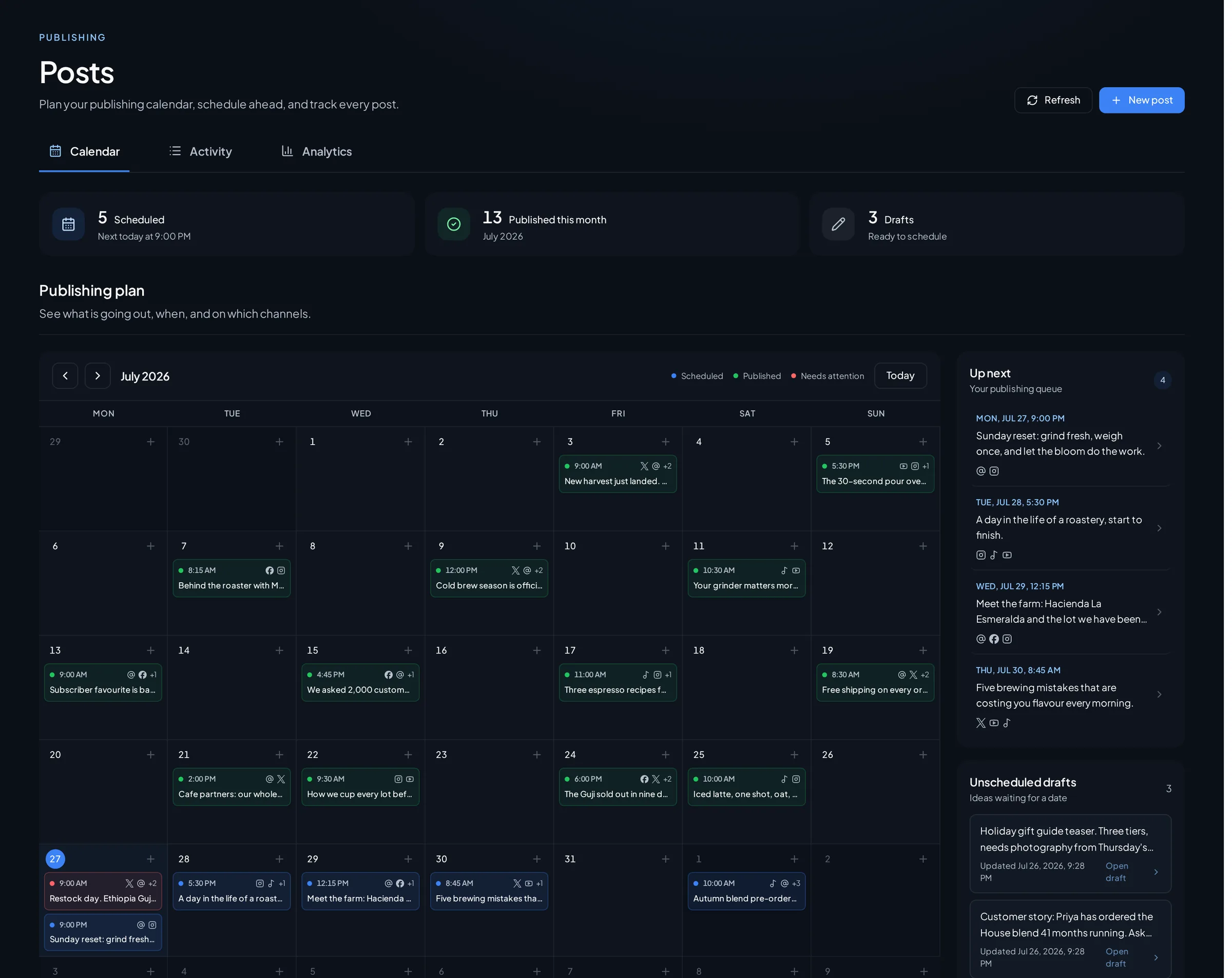
See the actual calendar screen
The Amplispect calendar: review your planned content together before choosing what to schedule. Product screenshot; separate from the illustrative coffee-shop plan above.
The Amplispect calendar: review your planned content together before choosing what to schedule. Product screenshot; separate from the illustrative coffee-shop plan above. Open full size ↗

Plan from brand context

Generic calendar prompts produce generic posts. Amplispect begins with the website and workspace context, giving the weekly plan a consistent product, audience, and voice to work from.

  • Reuse the same approved brand context from week to week.
  • Generate posts around the business rather than isolated trends.
  • Keep the plan focused enough for a human to review.

See the week before it goes live

The calendar makes timing, gaps, and repetition visible. Instead of approving captions one by one in different tools, you can review the shape of the week and adjust individual posts in context.

  • Review planned, draft, scheduled, and published posts together.
  • Move from calendar context into the composer for detailed edits.
  • Keep timely posts flexible while scheduling predictable content.

Connect planning to execution

A useful content calendar should reduce the distance between deciding and publishing. Amplispect keeps account selection, media, previews, timing, and destination status attached to the post.

  • Select the exact connected accounts for each post.
  • Schedule approved posts without rebuilding them elsewhere.
  • Check each publishing destination independently.
Workflow

Build the calendar around one repeatable week.

Use AI for the first draft of the plan, then apply human judgment to the message, timing, and destination.

01

Set the context

Use your website and workspace details to define what the business offers and how it should sound.

02

Generate the calendar

Create a week of planned posts with enough variety to review as a complete publishing rhythm.

03

Approve the queue

Edit each post, choose its accounts and time, then follow its progress from scheduled to published.

FAQ

Questions teams ask before using this workflow.

What should an AI social media content calendar include?

A useful calendar gives each post a purpose, draft caption, destination, and planned publish time. Include a mix of helpful advice, conversation, product information, and clear next steps. The sample week on this page shows one possible mix; adapt it to your business.

Can I download the sample calendar for free?

Yes. Download the seven-day coffee-shop example as a CSV without signing in. It is an illustrative planning resource, not a personalized generation. To create drafts using your own website and brand context, create an Amplispect workspace.

Will the AI calendar publish posts automatically?

Generating a plan prepares drafts for review. Check facts and links, add suitable media, choose connected Instagram, Threads, or X accounts, and approve the schedule before publishing.

Related workflows

Turn the calendar into live content.